In this chapter, you will learn about one of the most important concepts in CSS: the CSS Box Model. Every HTML element is treated like a box, and understanding this box will help you control spacing and size more easily. Don’t worry if it sounds confusing at first. Let’s look at each part one by one.
What is the CSS Box Model?
The CSS Box Model explains how much space an HTML element takes on a web page. Every element is made up of four main parts:
- Content
- Padding
- Border
- Margin
Think of it like layers around the content:
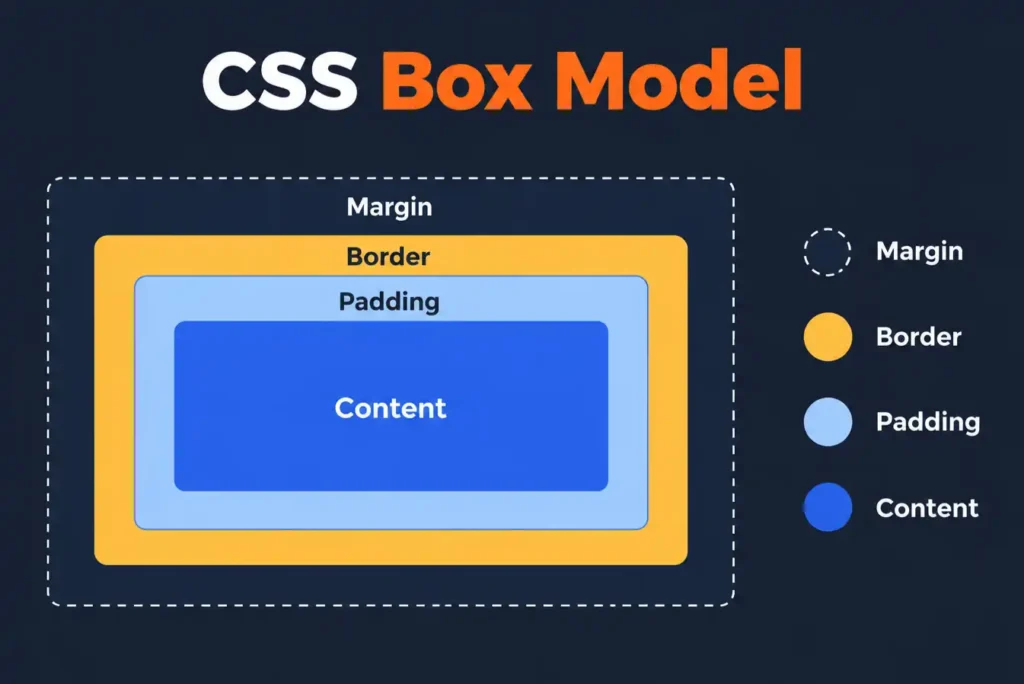
Let’s understand each part.
1. Content
The content is the actual text, image, or other information inside an element.
For example:
<p>Hello, I am learning CSS.</p>
The text inside the paragraph is the content.
You can control the size of the content area using properties like:
p {
  width: 300px;
  height: 100px;
}
Here, the paragraph has a width of 300px and a height of 100px.
2. Padding
Padding is the space between the content and the border.
For example:
p {
  padding: 20px;
}
This adds 20px of space around the content inside the element. If there is a background color, you can clearly see the padding area.
3. Border
The border goes around the padding and content.
For example:
p {
  border: 3px solid blue;
}
This creates a 3px solid blue border around the element.
4. Margin
The margin is the space outside the border.
For example:
p {
  margin: 30px;
}
This creates 30px of space outside the element. The margin helps create space between one element and another.
Seeing All Parts Together
Now, let’s use content, padding, border, and margin in one example.
<!DOCTYPE html>
<html>
<head>
  <title>CSS Box Model</title>

  <style>
    .box {
      width: 300px;
      padding: 20px;
      border: 5px solid blue;
      margin: 30px;
      background-color: lightblue;
    }
  </style>
</head>

<body>

  <div class="box">
    This is the content inside the box.
  </div>

</body>
</html>
Let’s understand what happens here:
width: 300pxsets the width of the content area.padding: 20pxadds space inside the box.border: 5px solid blueadds a border around the padding.margin: 30pxadds space outside the box.
When you run the code, you will see a box with space both inside and outside it.
Understanding the Total Width
Here is something important to remember.
By default, when you set:
.box {
  width: 300px;
  padding: 20px;
  border: 5px solid blue;
}
The total width of the element is more than 300px.
It becomes:
Content width = 300px
Left and right padding = 40px
Left and right border = 10px

Total width = 350px
This happens because padding and borders are added outside the width of the content area.
Using box-sizing: border-box
Sometimes, you may want the width to include the padding and border.
For that, you can use:
.box {
  width: 300px;
  padding: 20px;
  border: 5px solid blue;
  box-sizing: border-box;
}
Now, the total width of the element will stay at 300px. The padding and border will fit inside that width.
Example
<!DOCTYPE html>
<html>
<head>
  <title>Box Sizing Example</title>

  <style>
    .box {
      width: 300px;
      padding: 20px;
      border: 5px solid green;
      background-color: lightgreen;
      box-sizing: border-box;
    }
  </style>
</head>

<body>

  <div class="box">
    This box has a total width of 300px.
  </div>

</body>
</html>
The box-sizing: border-box property is commonly used in CSS because it makes it easier to control element sizes.
A common practice is to apply it to all elements:
* {
  box-sizing: border-box;
}
This makes width and height calculations easier when building layouts.
Quick Recap
- Every HTML element is treated like a box.
- The CSS Box Model has four parts: content, padding, border, and margin.
- Padding creates space inside the element.
- Border goes around the padding and content.
- Margin creates space outside the element.
- By default, padding and borders add to the total width and height.
box-sizing: border-boxincludes padding and border inside the set width and height.
Mini Quiz
Mini Project
Mini Project: Student ID Card
Question:
Create a simple Student ID Card using the CSS Box Model. The card should have a fixed size, space around its content, a visible border, and space outside the card.
Requirements
- Add a
divfor the student ID card with a width of300px. - Add a student name and a short course description inside the card.
- Use
paddingto create space between the content and the border. - Add a
borderaround the card. Usemarginto create space outside the card. - Add a background color to make the different box areas easier to see.
- Use
box-sizing: border-boxso the padding and border are included within the300pxwidth. - Create a second card and use different margin and padding values so the difference between content, padding, border, and margin can be observed.
View Answer Code
<!DOCTYPE html>
<html>
<head>
    <title>Student ID Card</title>

    <style>
        .card {
            width: 300px;
            padding: 20px;
            border: 5px solid blue;
            margin: 30px;
            background-color: lightblue;
            box-sizing: border-box;
        }

        .card2 {
            width: 300px;
            padding: 30px;
            border: 3px solid green;
            margin: 50px;
            background-color: lightgreen;
            box-sizing: border-box;
        }
    </style>
</head>

<body>

    <div class="card">
        <h1>Rahul Sharma</h1>
        <p>Full Stack Development Student</p>
    </div>

    <div class="card2">
        <h1>Priya Verma</h1>
        <p>Data Analytics Student</p>
    </div>

</body>
</html>
Frequently Asked Questions (FAQs)
Q1. What is the CSS Box Model?
The CSS Box Model is a concept that explains how much space an HTML element takes on a web page. Every element is treated as a box made up of content, padding, border, and margin.
Q2. What are the four parts of the CSS Box Model?
The four main parts of the CSS Box Model are content, padding, border, and margin.
Q3. What is the difference between padding and margin?
Padding creates space inside an element between the content and border, while margin creates space outside the border between the element and other elements.
Q4. Why is the CSS Box Model important?
The CSS Box Model is important because it helps you understand how spacing, borders, padding, and element sizes work when designing web page layouts.
Written by Shubhranshu Shekhar, who has trained 20000+ students in coding.