In this chapter, you will learn how to add space inside HTML elements using CSS padding. Padding creates space between an element’s content and its border, making the content look less crowded. Let’s understand how CSS padding.
What is CSS Padding?
Padding is the space inside an HTML element. It creates space between the content and the border of an element.
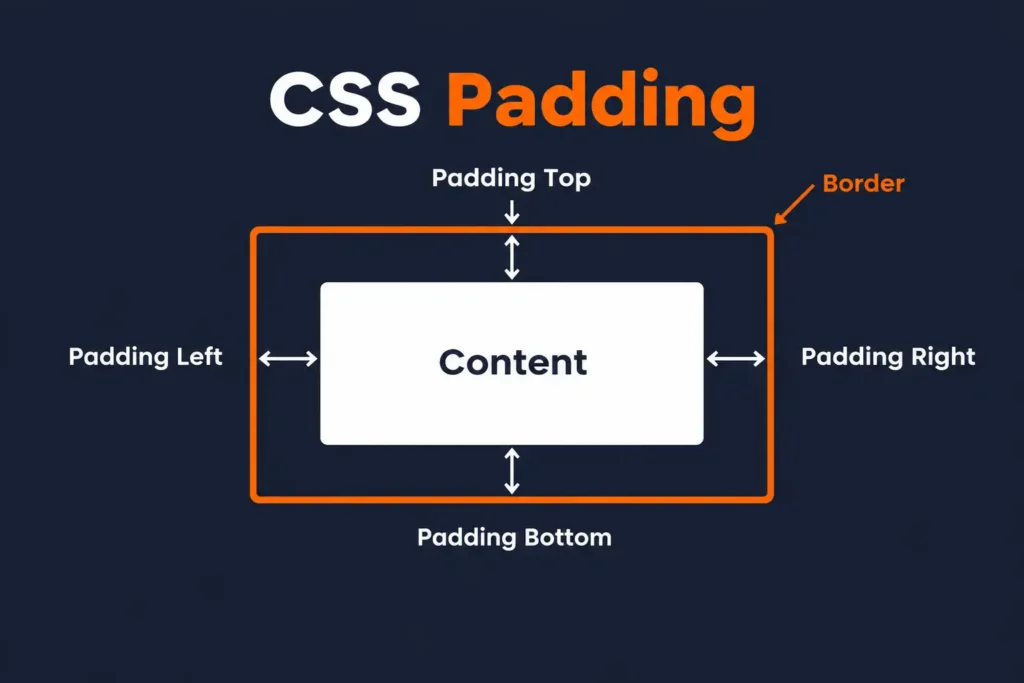
CSS Padding Syntax:
p {
  padding: 20px;
}
This adds 20px of space around the content inside the paragraph.
To understand it better:
- Margin creates space outside an element.
- Padding creates space inside an element.
1. Using the Padding Property
The padding property is used to add space inside an element.
Example
<!DOCTYPE html>
<html>
<head>
  <title>CSS Padding</title>

  <style>
    p {
      background-color: lightblue;
      border: 2px solid blue;
      padding: 20px;
    }
  </style>
</head>

<body>

  <p>This paragraph has 20px of padding.</p>

</body>
</html>
Result
You will see space between the paragraph text and its border. The padding: 20px; adds space on all four sides of the content.
2. Padding on Individual Sides
You can also add different amounts of padding to each side of an element. CSS provides four padding properties:
padding-top
padding-right
padding-bottom
padding-left
Example
p {
  padding-top: 10px;
  padding-right: 20px;
  padding-bottom: 30px;
  padding-left: 40px;
}
This adds different amounts of space inside the element on each side.
Complete Example
<!DOCTYPE html>
<html>
<head>
  <title>Padding on Different Sides</title>

  <style>
    p {
      background-color: lightyellow;
      border: 2px solid orange;
      padding-top: 10px;
      padding-right: 30px;
      padding-bottom: 20px;
      padding-left: 40px;
    }
  </style>
</head>

<body>

  <p>This paragraph has different padding on each side.</p>

</body>
</html>
3. Padding Shorthand Property
Instead of writing four separate properties, you can use the shorthand padding property.
Four Values
p {
  padding: 10px 20px 30px 40px;
}
The values are applied in this order:
Top → Right → Bottom → LeftSo:
10px→ Top20px→ Right30px→ Bottom40px→ Left
Three Values
p {
  padding: 10px 20px 30px;
}
This means:
10px→ Top20px→ Right and Left30px→ Bottom
Two Values
p {
  padding: 20px 40px;
}
This means:
20px→ Top and Bottom40px→ Right and Left
One Value
p {
  padding: 25px;
}
This adds 25px of padding on all four sides.
4. Padding with Background and Border
Padding becomes easier to notice when you add a background color and border to an element.
<!DOCTYPE html>
<html>
<head>
  <title>CSS Padding Example</title>

  <style>
    div {
      background-color: lightgreen;
      border: 3px solid green;
      padding: 30px;
    }
  </style>
</head>

<body>

  <div>
    This box has padding around its content.
  </div>

</body>
</html>
The green space inside the border is affected by the padding.
Padding and Element Size
Padding can increase the total space taken by an element. For example:
div {
  width: 300px;
  padding: 20px;
}
The 300px width applies to the content area. The padding adds extra space around that content.
Margin vs Padding
Both margin and padding create space, but they work in different places.
- Margin → Space outside the border.
- Padding → Space inside the border.
You can see the difference in this example:
<!DOCTYPE html>
<html>
<head>
  <title>Margin and Padding</title>

  <style>
    p {
      background-color: lightblue;
      border: 2px solid blue;
      margin: 30px;
      padding: 20px;
    }
  </style>
</head>

<body>

  <p>This paragraph uses both margin and padding.</p>

</body>
</html>
The margin creates space outside the paragraph, while the padding creates space between the text and the border.
Quick Recap
- Padding creates space inside an HTML element.
- The
paddingproperty adds space on all sides. - You can control each side using
padding-top,padding-right,padding-bottom, andpadding-left. - The shorthand
paddingproperty can use one, two, three, or four values. - Padding creates space between the content and the border.
- Padding can affect the total space taken by an element.
Mini Quiz
Mini Project
Mini Project: Recipe Card
Question:
Create a simple Recipe Card webpage for your favorite dish. Use CSS padding to create comfortable space between the recipe content and its border, and use margin to separate the different parts of the card.
Requirements
- Add a main heading with the name of the dish.
- Add a short paragraph describing the dish.
- Create a
divfor the recipe card with a width of300px. - Add a background color and border to the recipe card.
- Use
paddingto create space between the recipe content and its border. - Use different padding values on the four sides of one element.
- Use padding shorthand with four values for another element.
- Add
margin: autoto center the recipe card horizontally. - Use margin to create space between the recipe card elements.
View Answer Code
<!DOCTYPE html>
<html>
<head>
    <title>Recipe Card</title>

    <style>
        div {
            width: 300px;
            background-color: lightyellow;
            border: 3px solid orange;
            padding: 25px;
            margin: auto;
        }

        h1 {
            padding: 20px;
            margin: 20px;
        }

        p {
            padding-top: 10px;
            padding-right: 20px;
            padding-bottom: 30px;
            padding-left: 20px;
            margin: 10px 20px;
        }

        h2 {
            padding: 10px 20px 15px 30px;
            margin: 20px;
        }
    </style>
</head>

<body>

    <div>

        <h1>Fruit Salad</h1>

        <p>
            A fresh and colorful fruit salad made with seasonal fruits.
        </p>

        <h2>Ingredients</h2>

        <p>
            Apples, bananas, oranges, grapes, and strawberries.
        </p>

    </div>

</body>
</html>
Frequently Asked Questions (FAQs)
Q1. What is CSS padding?
CSS padding is the space inside an HTML element. It creates space between the element’s content and its border.
Q2. How to add padding in CSS?
You can add space inside an HTML element using the CSS padding property. Padding can be applied to all sides of an element or controlled separately for each side.
Q3. What are the four padding properties in CSS?
The four individual padding properties are padding-top, padding-right, padding-bottom, and padding-left.
Q4. What is the CSS padding shorthand property?
The padding shorthand property allows you to set padding for multiple sides of an element using one declaration. You can use one, two, three, or four values.
Q5. What is the difference between margin and padding?
Margin creates space outside an element and its border, while padding creates space inside the element between the content and the border.
Written by Shubhranshu Shekhar, who has trained 20000+ students in coding.