Entry Tkinter is a widget to accept input from the user. Entry widget allows the user to enter information like text or numbers at the run time. In this Entry Tkinter tutorial we will learn everything about Entry to display and accept input as text from a user. Below the first program will show text box on the Tkinter window.
from tkinter import *
win=Tk()
win.geometry('250x250')
t1=Entry(win)
t1.grid(row=0,column=1)
win.mainloop()
Entry Textbox with Label and Button
from tkinter import *
win=Tk()
win.geometry('250x250')

l1=Label(win,text="First Name")
l1.grid(row=0,column=0)
t1=Entry(win)
t1.grid(row=0,column=1)

l2=Label(win,text="Second Name")
l2.grid(row=1,column=0)
t2=Entry(win)
t2.grid(row=1,column=1)

b1=Button(win,text="Click Here")
b1.grid(row=2,column=1)

win.mainloop()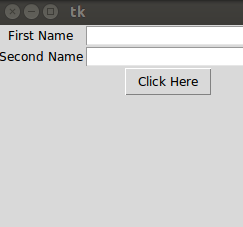
Entry Example to Show Sum of Two Numbers
In the below example, we are using two methods get() and insert() to accept user input and print the result in Entry.
- get() – It gets the value of the Entry as text, later we can convert in any type.
- insert() – It accept two-parameter and assign value to the Entry, the first parameter is index and second is value.
from tkinter import *
def sum():
    a=int(t1.get())
    b=int(t2.get())
    c=a+b
    t3.insert(0,c)
win=Tk()
win.geometry('250x250')

l1=Label(win,text="First Number")
l1.grid(row=0,column=0)
t1=Entry(win)
t1.grid(row=0,column=1)

l2=Label(win,text="Second Number")
l2.grid(row=1,column=0)
t2=Entry(win)
t2.grid(row=1,column=1)

l3=Label(win,text="Result")
l3.grid(row=2,column=0)
t3=Entry(win)
t3.grid(row=2,column=1)

b1=Button(win,text="Click For SUM",command=sum)
b1.grid(row=3,column=1)

win.mainloop()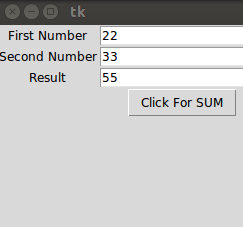
In the above example, we are using get() to accept input and insert() function to show the result. We know that the entry widget accepts input as a string, so we need to typecast in the number using int() function in python.
Mini Quiz
Written by Shubhranshu Shekhar, who has trained 20000+ students in coding.

Shubhranshu Shekhar is a coding instructor, mentor, and founder of VSIT Delhi with 20+ years of teaching experience (since 2004). He has guided many students who are now working in multinational companies and specializes in Full Stack Development, Python, Digital Marketing, and Data Analytics.